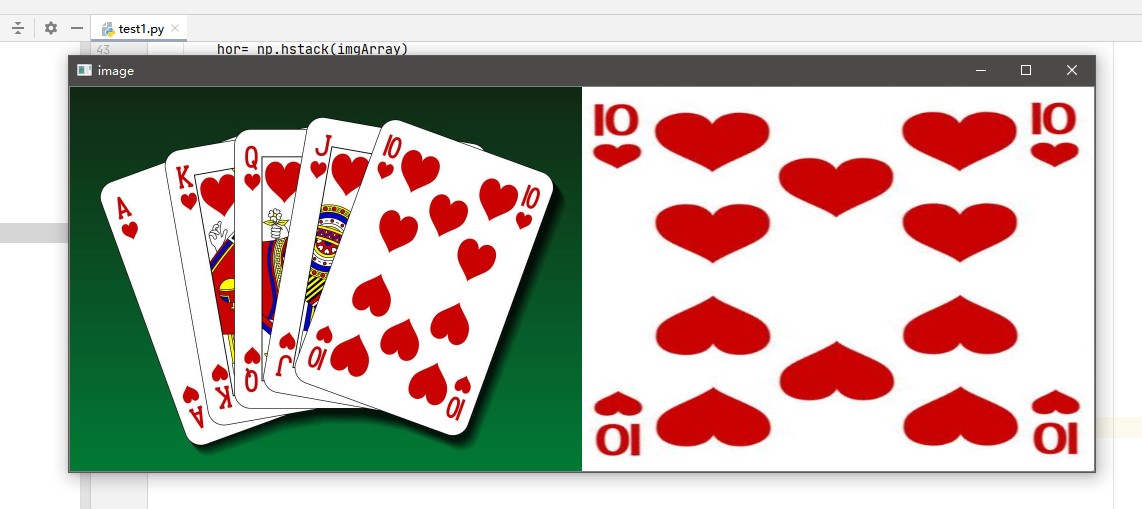
堆积函数

图片压缩与堆积函数。

1
2
3
4
5
6
7
8
9
10
11
12
13
14
15
16
17
18
19
20
21
22
23
24
25
26
27
28
29
30
31
32
33
34
35
36
37
38
39
40
41
42
43
44
45
# ^ 设置几张图片拼接
def stackImages(scale,imgArray):
rows = len(imgArray)
cols = len(imgArray[0])
# & 输出一个 rows * cols 的矩阵(imgArray)
print(rows,cols)
# & 判断imgArray[0] 是不是一个list
rowsAvailable = isinstance(imgArray[0], list)
# & imgArray[][] 是什么意思呢?
# & imgArray[0][0]就是指[0,0]的那个图片(我们把图片集分为二维矩阵,第一行、第一列的那个就是第一个图片)
# & 而shape[1]就是width,shape[0]是height,shape[2]是
width = imgArray[0][0].shape[1]
height = imgArray[0][0].shape[0]

# & 例如,我们可以展示一下是什么含义
cv2.imshow("img", imgArray[0][1])

if rowsAvailable:
for x in range (0, rows):
for y in range(0, cols):
# & 判断图像与后面那个图像的形状是否一致,若一致则进行等比例放缩;否则,先resize为一致,后进行放缩
if imgArray[x][y].shape[:2] == imgArray[0][0].shape [:2]:
imgArray[x][y] = cv2.resize(imgArray[x][y], (0, 0), None, scale, scale)
else:
imgArray[x][y] = cv2.resize(imgArray[x][y], (imgArray[0][0].shape[1], imgArray[0][0].shape[0]), None, scale, scale)
# & 如果是灰度图,则变成RGB图像(为了弄成一样的图像)
if len(imgArray[x][y].shape) == 2: imgArray[x][y]= cv2.cvtColor( imgArray[x][y], cv2.COLOR_GRAY2BGR)
# & 设置零矩阵
imageBlank = np.zeros((height, width, 3), np.uint8)
hor = [imageBlank]*rows
hor_con = [imageBlank]*rows
for x in range(0, rows):
hor[x] = np.hstack(imgArray[x])
ver = np.vstack(hor)
# & 如果不是一组照片,则仅仅进行放缩 or 灰度转化为RGB
else:
for x in range(0, rows):
if imgArray[x].shape[:2] == imgArray[0].shape[:2]:
imgArray[x] = cv2.resize(imgArray[x], (0, 0), None, scale, scale)
else:
imgArray[x] = cv2.resize(imgArray[x], (imgArray[0].shape[1], imgArray[0].shape[0]), None,scale, scale)
if len(imgArray[x].shape) == 2: imgArray[x] = cv2.cvtColor(imgArray[x], cv2.COLOR_GRAY2BGR)
hor= np.hstack(imgArray)
ver = hor
return ver

透视变换

可能要用到的函数:

  1. cv2.getPerspectiveTransform( )
  2. cv2.warpPerspective( )

基本思路:

对于视觉变换虽我们需要一个3x3变换矩阵。在变换前后直线还是是直线。要构建这个变换矩阵,需要在图像上找4个点,以及他们在输出图像上对应的位置。

可以直接用window的画图软件得到那4个点的位置

这个变换矩阵可以有函数,cv2.getPerspectiveTransform( )构建。然后把这个矩俤传给函数cv2.warpPerspective( )进行变换

1
2
3
4
5
6
7
8
9
10
11
12
13
14
15
16
17
18
19
20
21
22
23
24
25
26
27
28
29
30
31
32
33
34
35
36
37
38
39
40
41
42
43
44
45
46
47
48
49
50
51
52
53
54
55
56
57
58
59
60
61
import cv2
import numpy as np
import matplotlib.pyplot as plt

def stackImages(scale,imgArray):
rows = len(imgArray)
cols = len(imgArray[0])
# & 输出一个 rows * cols 的矩阵(imgArray)
print(rows,cols)
# & 判断imgArray[0] 是不是一个list
rowsAvailable = isinstance(imgArray[0], list)
# & imgArray[][] 是什么意思呢?
# & imgArray[0][0]就是指[0,0]的那个图片(我们把图片集分为二维矩阵,第一行、第一列的那个就是第一个图片)
# & 而shape[1]就是width,shape[0]是height,shape[2]是
width = imgArray[0][0].shape[1]
height = imgArray[0][0].shape[0]

if rowsAvailable:
for x in range (0, rows):
for y in range(0, cols):
# & 判断图像与后面那个图像的形状是否一致,若一致则进行等比例放缩;否则,先resize为一致,后进行放缩
if imgArray[x][y].shape[:2] == imgArray[0][0].shape [:2]:
imgArray[x][y] = cv2.resize(imgArray[x][y], (0, 0), None, scale, scale)
else:
imgArray[x][y] = cv2.resize(imgArray[x][y], (imgArray[0][0].shape[1], imgArray[0][0].shape[0]), None, scale, scale)
# & 如果是灰度图,则变成RGB图像(为了弄成一样的图像)
if len(imgArray[x][y].shape) == 2: imgArray[x][y]= cv2.cvtColor( imgArray[x][y], cv2.COLOR_GRAY2BGR)
# & 设置零矩阵
imageBlank = np.zeros((height, width, 3), np.uint8)
hor = [imageBlank]*rows
hor_con = [imageBlank]*rows
for x in range(0, rows):
hor[x] = np.hstack(imgArray[x])
ver = np.vstack(hor)
# & 如果不是一组照片,则仅仅进行放缩 or 灰度转化为RGB
else:
for x in range(0, rows):
if imgArray[x].shape[:2] == imgArray[0].shape[:2]:
imgArray[x] = cv2.resize(imgArray[x], (0, 0), None, scale, scale)
else:
imgArray[x] = cv2.resize(imgArray[x], (imgArray[0].shape[1], imgArray[0].shape[0]), None,scale, scale)
if len(imgArray[x].shape) == 2: imgArray[x] = cv2.cvtColor(imgArray[x], cv2.COLOR_GRAY2BGR)
hor= np.hstack(imgArray)
ver = hor
return ver

img = cv2.imread('joker.jpg')
rows,cols,ch = img.shape
# 原图的四个点
pts1 = np.float32([[640,69],[963,189],[455,574],[778,694],])
# 输出图像的四个顶点
pts2 = np.float32([[0,0],[500,0],[0,500],[500,500]])
# 变换
x = cv2.getPerspectiveTransform(pts1,pts2)
# 仿射
img2 = cv2.warpPerspective(img,x,(500,500))
# 显示

img3=stackImages(0.5,[img,img2])
cv2.imshow("image",img3)
cv2.waitKey(0)